Usage
This guide walks through how to use KubeForenSys after installation. See How it works for how it works.
Basic Usage
After installing KubeForenSys, run the kubeforensys script using Python:
python3 kubeforensys.py
This runs the code with default settings.
Supplying arguments
KubeForenSys supports user-supplied CLI arguments to override settings:
python3 kubeforensys.py --help

usage: kubeforensys.py [-h] [--since_seconds SINCE_SECONDS]
               [--workspace_name WORKSPACE_NAME]
               [--dce_name DCE_NAME]
               [--location LOCATION]

A tool to collect Kubernetes data and push it to a Log Analytics workspace in Azure

options:
  -h, --help            show this help message and exit
  --since_seconds       Fetch logs since these many seconds ago (default: 86400)
  --workspace_name      Name of the Log Analytics workspace (default: 'Kube-LAW')
  --dce_name            Name of the Data Collection Endpoint (default: 'Kube-DCE')
  --location            Azure region (default: 'west-europe')
For instance, to set the workspace name to myCustomWorkspace and since_seconds to 3600, it would be passed as a parameter to KubeForenSys:
python3 kubeforensys.py --workspace_name myCustomWorkspace --since_seconds 3600
Investigating within Azure
Within Microsoft Azure, KQL can be used to search the data in a Log Analytics workspace and perform analysis during incident response. KubeForenSys creates custom tables to store the retrieved data. A union can be done on the tables, providing a Timeline object containing all data:
let Timeline = union
(kubelogs_CL
   | extend source = "kubelogs_CL", EventType = "KubeLog", namespace = tostring(NameSpace)
   | project TimeGenerated, source, EventType, namespace,
         Details = pack("Message", Message, "ContainerName", ContainerName, "PodName", PodName, "ContainerImages", ContainerImages, "Labels", Labels, "Annotations", Annotations)),
(kubeevents_CL
   | extend source = "kubeevents_CL", EventType = "KubeEvent", namespace = ""
   | project TimeGenerated, source, EventType, namespace,
         Details = pack("action", action, "first_timestamp", tostring(first_timestamp),
            "involved_object_name", involved_object_name, "involved_object_uid", involved_object_uid,
            "last_timestamp", tostring(last_timestamp), "message", message, "reason", reason,
            "reporting_component", reporting_component)),
(commandhistory_CL
   | extend source = "commandhistory_CL", EventType = "CommandExec"
   | project TimeGenerated, source, EventType, namespace,
         Details = pack("pod_name", pod_name, "container_name", container_name, "command", command)),
(serviceaccounts_CL
   | extend source = "serviceaccounts_CL", EventType = "ServiceAccount"
   | project TimeGenerated, source, EventType, namespace,
         Details = pack("name", name, "automount_service_account_token", automount_service_account_token, "image_pull_secrets", image_pull_secrets)),
(suspiciouspods_CL
   | extend source = "suspiciouspods_CL", EventType = "SuspiciousPod"
   | project TimeGenerated, source, EventType, namespace,
         Details = pack("name", name, "issue_type", issue_type, "details", details)),
(rbacbindings_CL
   | extend source = "rbacbindings_CL", EventType = "RBACBinding"
   | project TimeGenerated, source, EventType, namespace,
         Details = pack("binding_type", binding_type, "binding_name", binding_name, "subject_kind", subject_kind,
            "subject_name", subject_name, "subject_namespace", subject_namespace, "role_ref_kind", role_ref_kind,
            "role_ref_name", role_ref_name)),
(cronjobs_CL
   | extend source = "cronjobs_CL", EventType = "CronJob"
   | project TimeGenerated, source, EventType, namespace,
         Details = pack("cronjob_name", cronjob_name, "container_name", container_name, "image", image, "command", command, "schedule", schedule)),
(networkpolicies_CL
   | extend source = "networkpolicies_CL", EventType = "NetworkPolicy"
   | project TimeGenerated, source, EventType, namespace,
         Details = pack("name", name));
Timeline
| where TimeGenerated > ago(1d)
| sort by TimeGenerated asc
Returning:
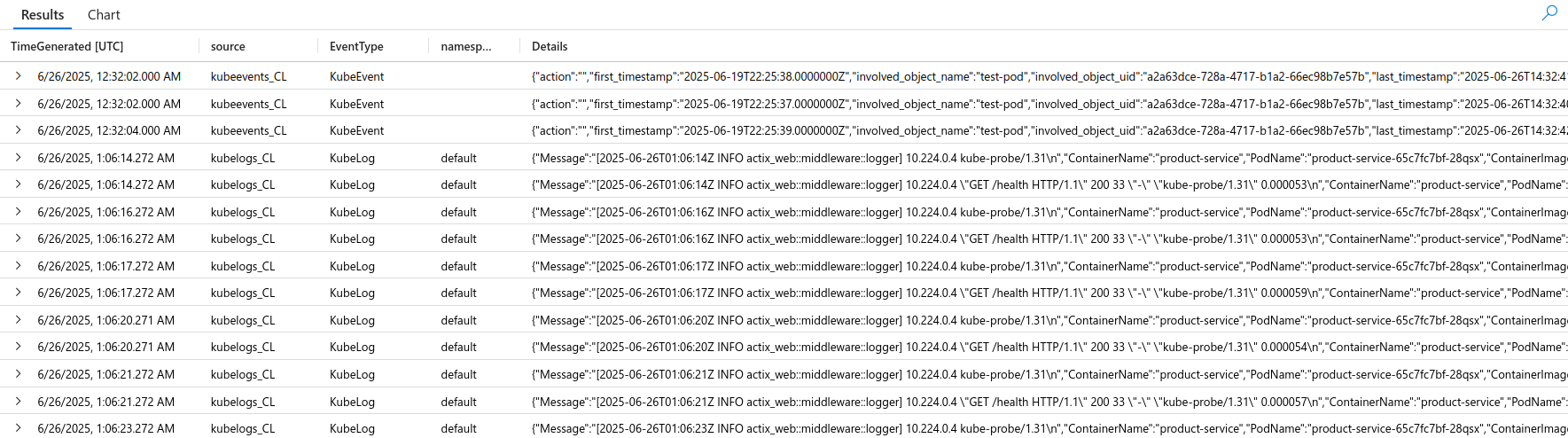
Using this Timeline object, data can be narrowed down to e.g. a specific container or pod using the Details column, containing JSON.